-
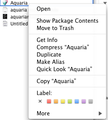
Select Show Package Contents.
-
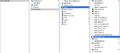
Navigate to the ingredients file.


To start editing Aquaria (on mac) you'll need to  click and select Show Package Contents. Then go to Contents→Resources→Data→Ingredients. This is where you edit what foods do what. Once the file is open, you should see a long string of words like this:
CrabMeat crab-meat Meat
FishMeat fish-meat Meat
FishOil fish-oil Oil
JellyOil jelly-oil Oil
RubberyMeat rubbery-meat Meat
SmallBone small-bone Bone
SmallEgg small-egg Egg
SmallEye small-eye Part
SmallTentacle small-tentacle Tentacle
RedBerry red-berry Berry
SmallEgg small-egg Egg
HeartySoup hearty-soup Soup (+speed +defense)
SeaLoaf sealoaf Loaf (~hp)
SeaCake sea-cake Cake (+hp)
PlantLeaf plant-leaf Leaf
ButterySeaLoaf buttery-sealoaf Loaf (+hp)
HealingPoultice healing-poultice Poultice (++hp)
MagicSoup magic-soup Soup (+speed ++hp)
etc.
The he more + signs, the more effective it is.
As an example, if you wanted to mod Sea Loaf, it would look like this: SeaLoaf sealoaf Loaf (~hp). The ~hp means it heals you, but only a little. If you want to make it heal more, take the ~ out and add +s. The more +s you add, the more health you will receive.
+speedis adding speed for 45 seconds.+energyis +# to energy shot for 45 seconds.+tripis tripping out.- The more + signs, the more time. "++" is around 30 seconds, and "~" is one second.
+regenis regeneration.+defenseis defense.+webis web ability.maxhpis maximum health, no + signs needed.-blindmakes you see better.+invincibleis self explanatory.
It is also possible to create or modify an existing recipe. For example you can copy the Hot Soup recipe and change the oil and meat entries to be SmallBone and SmallBone. From that point on, you can create Hot Soup by using Meat and Oil or a Small Bone and a Small Bone.