Metroid Prime Hunters/Controls

From StrategyWiki, the free strategy guide and walkthrough wiki

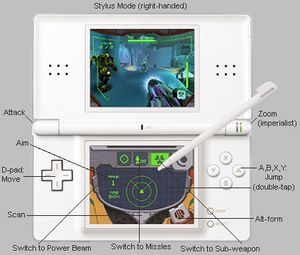
Metroid Prime: Hunters control positions.

Since the controls are somewhat complex, a diagram is available to illustrate each control. Alternate control schemes are also listed in text form. It is suggested, however, that stylus or left stylus mode is used.

[edit] Control type S: Stylus Mode

  • Neutral dpad - Move forward/backward, strafe
  • X button - Jump
  • B button - Jump
  • Y button - Jump
  • A button - Jump
  • L button - Attack
  • R button - Zoom (imperialist), Boost (morph ball)
  • Stylus button - Look around, jump, switch weapons and items

[edit] Control type SL: Stylus Mirror Mode

  • Neutral dpad - Jump
  • X button - Move forward
  • B button - Move backward
  • Y button - Strafe left
  • A button - Strafe right
  • R button - Attack
  • L button - Zoom (imperialist), Boost (morph ball)
  • Stylus button - Look around, jump, switch weapons & items

[edit] Control type DR: Dual Mode

  • Neutral dpad - Move forward/backward, strafe
  • X button - Look up
  • B button - Look down
  • Y button - Look left
  • A button - Look right
  • L button - Attack
  • R button - Jump

[edit] Control type DL: Dual Mirror Mode

  • Neutral dpad - Look
  • X button - Move forward
  • B button - Move backward
  • Y button - Strafe left
  • A button - Strafe right
  • L button - Jump
  • R button - Attack