Jump to navigation
Jump to search
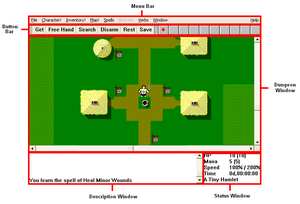
Main screen interface with labels.


Main screen overview[edit]
[edit]
File[edit]
Character![edit]
Inventory![edit]
The Inventory! command brings up the inventory screen, which also appears whenever the player is in a shop.
Sort Pack![edit]
Name Object[edit]
Map![edit]
Spells[edit]
Activate[edit]
Verbs[edit]
Window[edit]
Help[edit]
Button Bar[edit]
Get[edit]
Free Hand[edit]
Search[edit]
Disarm[edit]
Rest[edit]
Attempts to Rest Until Healed (not resting until mana is restored). You may be interrupted if a monster appears in the vicinity.
Save[edit]
Spell buttons[edit]
Dungeon Window[edit]
Status Window[edit]
Description Window[edit]
Inventory screen overview[edit]
Body slots[edit]
Stores[edit]
Stores are described in more detail in the Stores page.