Fatal Fury 3/Hidden Desperation

From StrategyWiki, the video game walkthrough and strategy guide wiki
Jump to: navigation, search

Contents

[edit] Unlocking the Hidden Desperation Moves

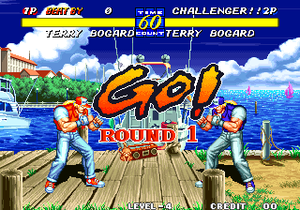
Screenshot FF3 UnlockHDM.png

In order to perform Hidden Desperation -Moves, they must be unlocked first.

To do that you need to press Arcade-Button-APunch.png+Arcade-Button-BKick.png+Arcade-Button-CPunch.png+Arcade-Button-DKick.png+Arcade-Button-Start.png at the start of the round as soon as the GO!-sign appears on the screen. If done correctly, your name will turn from white to green. You are now able to perform Hidden Desperation-Moves.

[edit] Basic Information

  • Hidden Desperation-Moves can only be performed when your lifebar is flashing
  • Hidden Desperation-Moves can only be performed once per round
  • The input procedure for the Hidden Desperation-Moves is divided into 2 parts:
    • the first part activates the input code, this is signaled by the flashing of your characters name
    • the second part is the actual movement for the Hidden Desperation-Move, this part must be entered directly after your name starts flashing and must be finished before the flashing ends

[edit] Description

[edit] Andy Bogard

Name Bokosuka Reppadan
Init Arcade-Button-DKick.png then Arcade-Stick-Down.png+Arcade-Button-CPunch.png
Move Arcade-Stick-Qcb.pngArcade-Stick-Right.png+Arcade-Button-CPunch.png+Arcade-Button-DKick.png
  • Stand close to the enemy and Arcade-Button-DKick.png. As soon as it hits (the first kick must connect in order for the move to work) chancel it into Arcade-Stick-Down.png+Arcade-Button-CPunch.png. This will make your name blink.
  • As soon as the Punch hits, chancel it into the actual movement for the HDM (Arcade-Stick-Qcb.pngArcade-Stick-Right.png+Arcade-Button-CPunch.png+Arcade-Button-DKick.png). Has to be done very fast in order to work.
[edit] Blue Mary

Name Mary Cyclone
Init none
Move Arcade-Stick-Left.pngArcade-Stick-Hcb.png+Arcade-Button-CPunch.png or Arcade-Stick-RDp.png+Arcade-Button-CPunch.png
  • There are no known conditions for Blue Mary's HDM. Seems to always work.
  • Just insert Arcade-Stick-Left.pngArcade-Stick-Hcb.png+Arcade-Button-CPunch.png or Arcade-Stick-RDp.png+Arcade-Button-CPunch.png.

[edit] Bob Wilson

Name Dangerous Bob
Init Arcade-Stick-Right.pngArcade-Stick-Right.png
Move Arcade-Stick-DL.pngArcade-Stick-UR.png+Arcade-Button-CPunch.png+Arcade-Button-DKick.png
  • The dashing (Arcade-Stick-Right.pngArcade-Stick-Right.png) causes your name to blink.
  • Insert the remaining movement (Arcade-Stick-DL.pngArcade-Stick-UR.png+Arcade-Button-CPunch.png+Arcade-Button-DKick.png) directly afterwards.

[edit] Franco Bash

Name Genocide Buster
Init Arcade-Button-DKick.png, then Arcade-Stick-Down.png+Arcade-Button-CPunch.png
Move Arcade-Stick-Hcb.png+Arcade-Button-CPunch.png+Arcade-Button-DKick.png
  • Stand close to the enemy and Arcade-Button-DKick.png. As soon as it hits (the first kick must connect in order for the move to work) chancel it into Arcade-Stick-Down.png+Arcade-Button-CPunch.png. This will make your name blink.
  • As soon as the Punch hits, chancel it into the actual movement for the HDM (Arcade-Stick-Hcb.png+Arcade-Button-CPunch.png+Arcade-Button-DKick.png). Has to be done very fast in order to work.

[edit] Geese Howard

Name Shin Raging Storm
Init Arcade-Stick-Down.pngArcade-Button-CPunch.png, then Arcade-Button-CPunch.png
Move Arcade-Stick-Qcb.pngArcade-Stick-Right.png+Arcade-Button-CPunch.png+Arcade-Button-DKick.png
  • Stand close to the enemy and Arcade-Stick-Down.pngArcade-Button-CPunch.png. As soon as it hits (the first punch must connect in order for the move to work) chancel it into Arcade-Button-CPunch.png. This will make your name blink.
  • As soon as the second Punch hits, chancel it into the actual movement for the HDM (Arcade-Stick-Qcb.pngArcade-Stick-Right.png+Arcade-Button-CPunch.png+Arcade-Button-DKick.png). Has to be done very fast in order to work.

[edit] Hon Fu

Name Kadent Susa no Taifuu
Init Arcade-Stick-Left.pngArcade-Stick-Left.png
Move Arcade-Stick-Hcb.pngArcade-Stick-Hcb.png+Arcade-Button-CPunch.png+Arcade-Button-DKick.png
  • The dashing (Arcade-Stick-Left.pngArcade-Stick-Left.png) causes your name to blink at every odd numbered clock tick.
  • The remaining motion (Arcade-Stick-Hcb.pngArcade-Stick-Hcb.png+Arcade-Button-CPunch.png+Arcade-Button-DKick.png) can be inserted at any odd numbered clock tick when your name is blinking. This HDM can not be performed when the game is set to an infinite timer.

[edit] Joe Higashi

Name Advancing Screw
Init move far away from opponent
Move Arcade-Stick-Left.pngArcade-Stick-Hcb.png+ Arcade-Button-CPunch.png+Arcade-Button-DKick.png
  • Move to a far distance to get your name to blink.
  • Simply insert the HDM-Motion (Arcade-Stick-Left.pngArcade-Stick-Hcb.png+ Arcade-Button-CPunch.png+Arcade-Button-DKick.png) when your name is blinking.

[edit] Mai Shiranui

Name Shiranui Hiohgi
Init (far)(hold)Arcade-Button-CPunch.png
Move (while holding Arcade-Button-CPunch.png) Arcade-Stick-Right.pngArcade-Stick-DL.pngArcade-Stick-Right.png+Arcade-Button-BKick.png+Arcade-Button-DKick.png
  • Has to be performed at a far distance. Press Arcade-Button-CPunch.png to tease your opponent. Keep on holding down Arcade-Button-CPunch.png, this will cause your name to blink.
  • While still holding down Arcade-Button-CPunch.png, insert the HDM motion (Arcade-Stick-Right.pngArcade-Stick-DL.pngArcade-Stick-Right.png+Arcade-Button-BKick.png+Arcade-Button-DKick.png)

[edit] Sokaku Mochizuki

Name Kishin Shokan
Init get hit by Arcade-Button-CPunch.png or Arcade-Button-DKick.png
Move Arcade-Stick-Hcb.png+Arcade-Button-CPunch.png+Arcade-Button-DKick.png
  • Your name will blink every time you are hit by Arcade-Button-CPunch.png or Arcade-Button-DKick.png.
  • Perform Arcade-Stick-Hcb.png+Arcade-Button-CPunch.png+Arcade-Button-DKick.png when your name is blinking.

[edit] Terry Bogard

Name Tripple Geyser
Init Arcade-Stick-DL.png+Arcade-Button-CPunch.png, then Arcade-Stick-Right.png+Arcade-Button-CPunch.png
Move Arcade-Stick-Qcb.pngArcade-Stick-Right.png+Arcade-Button-CPunch.png+Arcade-Button-DKick.png
  • Stand close to the enemy and Arcade-Stick-DL.png+Arcade-Button-CPunch.png. As soon as it hits (the first hit must connect in order for the move to work) chancel it into Arcade-Stick-Right.png+Arcade-Button-CPunch.png. This will make your name blink.
  • As soon as the Straight Punch hits, chancel it into the actual movement for the HDM (Arcade-Stick-Qcb.pngArcade-Stick-Right.png+Arcade-Button-CPunch.png+Arcade-Button-DKick.png). Has to be done very fast in order to work.
Social networking
Personal tools
Namespaces

Variants
Views
Actions